
In short
- Under Article 3(60) of the AI Act, a deep fake is AI-generated or manipulated content that resembles real people, objects, places, entities or events and would falsely appear authentic or truthful.
- Since 2 August 2026, professionals who use AI to create or alter a deep fake must disclose it (Article 50(4)). Purely personal use is excluded.
- Dragons, cartoons and minor edits such as colour correction are usually not deep fakes.
- The label must be clear and distinguishable, seen at first exposure and perceivable without tools: the AI tool's metadata alone isn't enough.
- Evidently artistic, satirical or fictional works still need a disclosure, one that doesn't hamper the work. No label makes a deep fake lawful: consent and other laws still apply.
What is a deepfake under the AI Act?
The AI Act (Regulation (EU) 2024/1689) writes it in two words, deep fake. Article 3(60) defines it as “AI-generated or manipulated image, audio or video content that resembles existing persons, objects, places, entities or events and would falsely appear to a person to be authentic or truthful”. In plain words: a picture made or changed with AI that looks real, and that someone could take for real.
The Commission's Guidelines on Article 50 (paragraph 113) split this into four criteria. All four must be met:
- Resemblance: a high level of similarity to the subject, judged on its distinctive features. It doesn't have to be identical.
- Existing: the subject exists, or could plausibly exist or have existed. A photorealistic person who never lived can qualify; a dragon or an elephant driving a car can't.
- Persons, objects, places, entities or events: including realistic AI avatars, buildings, artworks, products, animals and realistic scenes.
- False appearance: the content would falsely appear authentic or truthful to someone.
Is my AI image a deepfake? The Commission's examples
The Guidelines give examples on both sides of the line. Some are videos, but the reasoning is the same for a picture.
Deep fakes
- Two real footballers, placed by AI in front of a stadium-like building.
- Someone resembling a politician, giving a speech.
- An AI-generated celebrity influencer in an ad.
- A realistic avatar of a company's CEO congratulating staff.
- An AI product image that misleads about how the real product looks or performs.
Not deep fakes
- A sphinx flying over the Eiffel Tower.
- Mice arguing about cheese in a cheese maker's ad.
- An AI cartoon of an existing image of a historical event.
- Fictional forests and castles in a video game.
- A real car against an AI background, if the ad doesn't mislead about the car.
- No intent needed: the test is objective (paragraph 114). An image can be a deep fake even if you never meant to deceive anyone.
- Context and audience count: where the image is shown, and what the people likely to see it expect, including children or people less familiar with AI (paragraph 115). If part of that audience could be misled, that can be enough.
- Photorealism makes a deep fake more likely, but isn't decisive on its own.
- Minor edits usually don't count (paragraph 116): removing passers-by, light and colour correction, noise reduction, cosmetic adjustments, or an aesthetic background change in a product ad. Substantial AI editing of a news photo's background may.
Who must label a deepfake?
Article 50(4) puts the duty on deployers: people and organisations using AI in a professional capacity. Business, trade and freelance work count, and so does gaining an economic benefit on a regular basis (Guidelines, paragraph 19). Staff act for their employer: the company is the deployer (paragraph 14).
Purely personal use is excluded (Article 2(10)), such as deep fakes of your household or ones you post on social media in a personal capacity. Platforms may still ask you to label: see AI labels on social media.
- Since 2 August 2026, with no grace period for deployers. The Digital Omnibus delayed only the providers' machine-readable marking, to 2 December 2026, for generative AI systems placed on the market before 2 August 2026.
- No retroactive duty for deep fakes made before 2 August 2026, though labelling them is encouraged (paragraph 154).
Fines and enforcement are in our guide to the EU AI labelling law.
What a deepfake label must do
Article 50(4) asks deployers to disclose that the content has been artificially generated or manipulated. Article 50(5) adds “in a clear and distinguishable manner at the latest at the time of the first interaction or exposure”, and in an accessible way. For an image, that means:
- Clear and distinguishable: noticeable and easy to tell apart from its surroundings, not buried in a menu or the terms of use (Guidelines, paragraph 142).
- At first exposure: for every person who sees it, for example while scrolling a feed (paragraph 143).
- Visible to people: the AI provider's hidden watermark or metadata doesn't meet the deployer's duty (paragraph 117). Our guide to Detect AI-generated images explains what those marks do.
- Embedded in the image, visible against any background, where no other overlay gets in the way, “e.g., in the top right corner” (Code of Practice, Measure 1.2).
- Accessible: high contrast, and alt text for screen readers.
The Code accepts the EU icon or an equivalent label. The icon is optional, and using it doesn't by itself establish compliance.
Which EU icon for a deepfake?
Pick the European Commission's icon that says what happened to the picture:
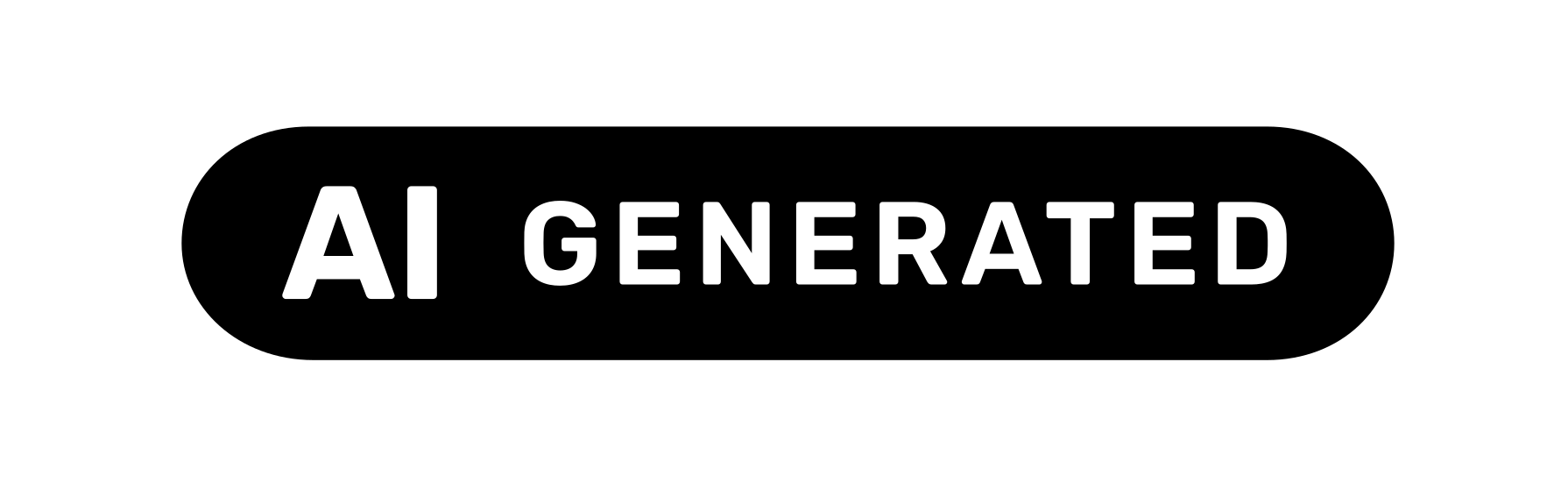
AI GENERATEDFully AI-generated
For a picture made entirely by AI, with no human-made part other than the prompt.
Example: a photorealistic image of a politician at an event that never happened.
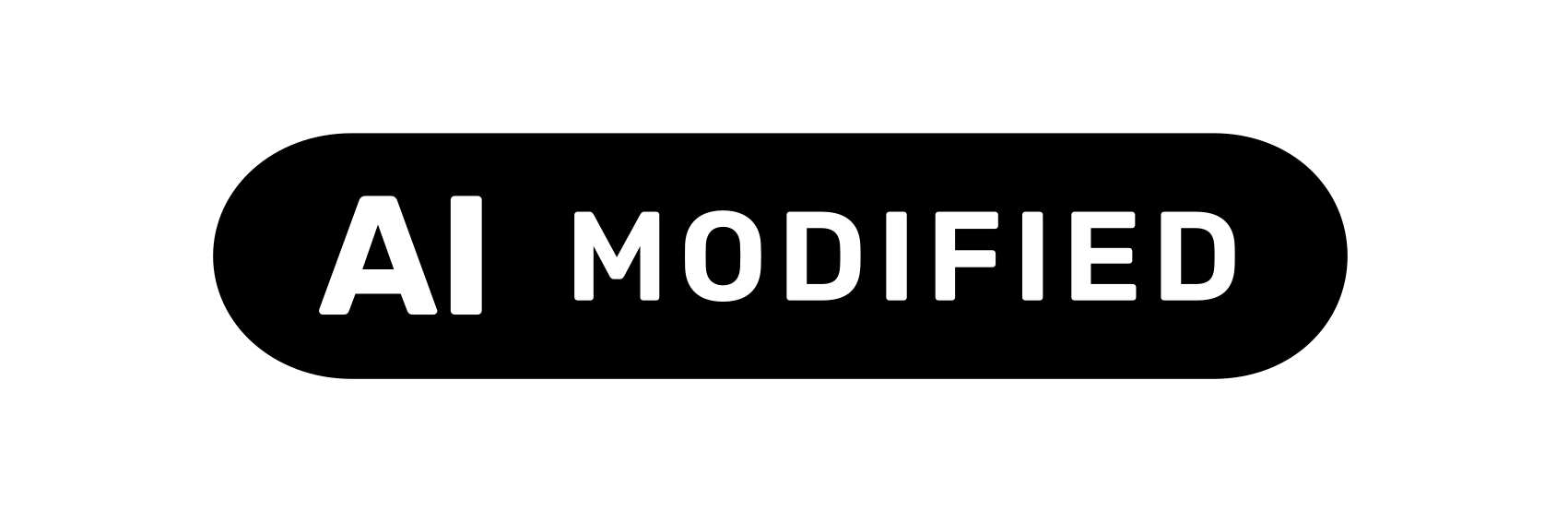
AI MODIFIEDPartially AI-modified
For a real, human-made picture partly changed with AI.
Example: a photo of an empty flat, furnished with AI.

AIBasic icon
When AI was involved, paired with your own words (“face generated with”) or an extra layer that tells more.
Example: “Background generated with” followed by the icon.
For a face swap in a real photo, use AI MODIFIED: a face in an authentic photo swapped for a politician's face is the Commission's own example. The Code also encourages saying what changed, such as “a face has been altered”. Colours, sizes and downloads are in our guide to the EU AI icons.
Deepfakes in art, satire and fiction
For a deep fake in an evidently artistic, creative, satirical, fictional or analogous work, Article 50(4) still requires a disclosure, but one that doesn't hamper the display or enjoyment of the work. The Guidelines read “evidently” strictly (paragraph 122): the work's nature must be obvious from its style, its context or what the audience expects. Ambiguous content gets the standard label, and so does purely informative or commercial content, such as news. Where informative and creative sides mix, the informative side prevails.
Lighter disclosure
- De-aged actors, or a digital replica of an actor who has died, in a film.
- An AI image of a real politician, clearly mocking their policies.
- Game imagery simulating real people.
Standard label
- A teleshopping-style video with simulated customers.
- Celebrities shown in events that never happened, with no satirical or fictional purpose.
- A synthetic influencer testing a sponsored product.
The Code (Commitment 3) suggests disclosing in the notes, the description or the credits, or next to the image frame on a website, as long as people notice it without clicking. On the picture itself, a smaller label or a quieter corner may suit the work, if it stays easy to see.
A label doesn't make a deepfake lawful
A label meets one AI Act duty and nothing more: complying with transparency rules doesn't make an AI use or its output lawful (recital 137). You still need the consent of the people shown, or of the rightsholders, where the law requires it (Code, Commitment 1). Data protection, copyright, trade marks, personality rights over a person's image and voice, misleading-advertising rules and criminal law all still apply (Guidelines, paragraphs 127 to 129).
How to add a deepfake label to your image
- Add your images
Drop or paste up to 100 into the tool at the top of this page or on the EU AI image label page. They stay in your browser: nothing is uploaded.
- Pick the icon
AI GENERATED for a fully generated picture, AI MODIFIED for a real photo changed with AI, such as a face swap.
- Place it
Top right by default, as in the Code's example, or any corner. You can also drag it where you want on the large preview.
- Make it visible
Automatic colour, the default, picks black or white for each image. The size is 5% of the shorter side by default, never under 24 pixels.
- Download and describe
Download each image or one ZIP, and start the alt text with “AI-generated image:”.
The tool adds the icon; whether and how to label stays your decision and your responsibility.
Official texts on deep fakes
 AI Act, Article 3: DefinitionsPoint (60) defines “deep fake”. AI Act Service Desk.
- AI Act, Article 50: Transparency obligationsParagraphs 4 and 5: disclosing deep fakes. AI Act Service Desk.
- Commission Guidelines on Article 50 (PDF)Approved 20 July 2026. Deep fakes: paragraphs 112 to 129.
- Code of Practice on Transparency of AI-Generated Content (PDF)Final version, 10 June 2026. Section 2: labelling by deployers.
- EU icons for labelling AI-generated contentThe three icons and their SVG and PNG downloads.
- Questions and answers on Article 50European Commission, updated 24 July 2026.
- Regulation (EU) 2024/1689 (AI Act)The authentic text, on EUR-Lex.
- Regulation (EU) 2026/1744 (Digital Omnibus on AI)In force since 27 July 2026, on EUR-Lex.